Posts

Tech Tank

Image

4 Secrets Wireless Hackers Don't Want You to Know

Image
You're using a wireless access point that has encryption so you're safe, right? Wrong! Hackers want you to believe that you are protected so you will remain vulnerable to their attacks. Here are 4 things that wireless hackers hope you won't find out, otherwise they might not be able to break into your network and/or computer: 1. WEP encryption is useless for protecting your wireless network. WEP is easily cracked within minutes and only provides users with a false sense of security.   Even a mediocre hacker can defeat Wired Equivalent Privacy (WEP)-based security in a matter of minutes, making it essentially useless as a protection mechanism. Many people set their wireless routers up years ago and have never bothered to change their wireless encryption from WEP to the newer and stronger WPA2 security. Updating your router to WPA2 is a fairly simple process. Visit your wireless router manufacturer's website for instructions. 2. Using your wireless router...

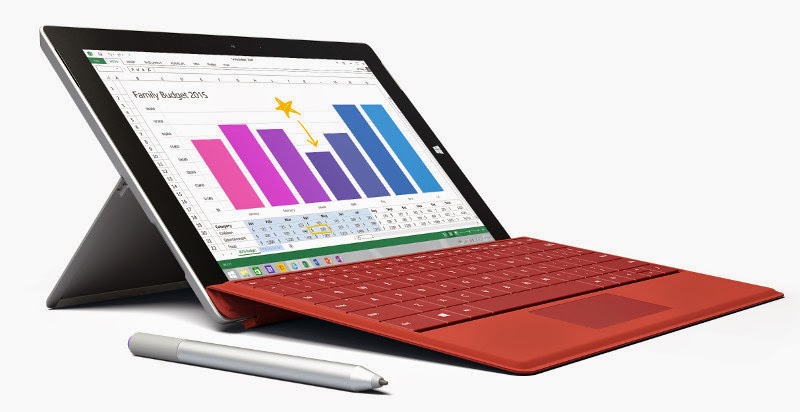
Microsoft Surface 3 with 10.8-inch HD display, Intel Atom x7 processor announced, starts at $499

Image
Microsoft just  announced  Surface 3, an affordable variant of the the Surface Pro 3 tablet  that  was announced last year. This is powered by quad-core Intel Atom x7 (Cherry Trail)  processor, has a 10.8-inch HD screen with 3:2 aspect ratio and runs on 64-bit Windows 8.1  OS, which is updradable to Windows 10 once available. It is slightly thinner at 8.7mm and  lighter at 622g compared to the Surface Pro 3 with a 12-inch screen. Microsoft says that it is  the thinnest and lightest Surface the company has ever shipped. It also comes with LTE  variant with built-in nano SIM slot. As usual it comes with one-year subscription to Office  365. It also supports Pen input, similar to the Surface Pro 3, but you have to purchase the pen  separately at $50 each in silver, blue, black and red colors. It also sell Type Cover in a range  of colors separately for $130 and the Docking Station is also available separately...

WhatsApp Voice Calling on Android now available for all without invite

Image
WhatsApp started rolling out voice calling feature for Android users earlier this year. It was  available only as invite-only option that opened occasionally, which required a person who  already have calling feature to call you to unlock it. Now, after the  latest version  (2.12.19)  that can be side-loaded on your phone, everyone using Android smartphones can enjoy  WhatsApp calling without invites. We tried it on several smartphones, including  smartphones running on Android Jelly Bean. As we said earlier, the call quality is decent on WiFi, but on 3G and 2G it was not the best.  This might improve over time. WhatsApp calling feature is currently available only on  Android. It is expected to roll out to other platforms soon. WhatsApp is yet to launch  WhatsApp calling officially. Since it is available for everyone, the announcement is expected  soon.

Google Chrome's Data Saver Feature Now Available for Desktop Users

Image
Google has launched a new Chrome browser extension called Data Saver, which can be used  to save bandwidth and time when loading Web pages. The service has till now been  primarily targeted at mobile users, since they suffer from limited connectivity and try to  save  expensive data. However, with the launch of this extension, Google has made the  service available to PC users of the Chrome browser as well. The Data Saver extension, currently in beta, can be downloaded from the  Chrome Web  Store . Google has been quiet about this launch, refraining from making any announcements  on the same. The extension was released on the Chrome Web Store on March 23. The extension will only work on Chrome 41 and above, and should turn on by default  immediately after installation. It can be disabled and re-enabled through settings. It should  also be pointed out that the extension does not function when used with secure (HTTPS)...

Gmail for Android gets “All Inboxes”, smart search and more

Image
Google has  updated  Gmail for Android with an important feature that will help users  organize their email accounts. The latest update adds “All Inboxes”, smart search and better  Drive integration. First up, Gmail is adding the ability for users to view emails from all your different accounts  in one spot with a new “All inboxes” option. This lets you respond to all of your emails  without needing to manually switch between accounts and it does not matter if its a Gmail  account as the feature works for non-Gmail accounts as well. Moving on, the latest update also adds Conversation View feature for email services beyond  Gmail like Yahoo, Outlook.com and other IMAP/POP accounts. All the emails will be  displayed in a “neatly stacked as one conversation.” The new Gmail for Android update will  even include improved auto-complete feature when searching for keywords, which will  allow  you to find the correc...

Microsoft adds Project Spartan browser in latest Windows 10 build

Image
Microsoft has launched a new Windows 10 preview for PCs and this one comes with  companies much talked about  Project Spartan  browser. The browser will ship with the  latest  Windows 10  version on smartphones, tablets and PCs. Project Spartan, the Internet Explorer successor, is touted as a browser that is made for  easy  sharing, reading, discovery and getting things done online.” The latest build number is  10049 and includes a preview version of the new browser. Project Spartan comes with  Cortana, the company’s digital assistant that lives in both current builds of Windows Phone  and Windows 10. The browser includes ink support, reading list/reading view and the new  Spartan rendering engine. Other features of the browser are Web Note, which will let users write or type directly on  web pages and then share them with other people. Microsoft says Project Spartan’s latest  design is “puts t...